
MyNorthwell
Northwell DeveloperMedical
3.8210.00 Reviews
- Version
- 11.8.2
- Installs
- 100.00K
- Age Rating
- Everyone
Screenshots
Our Review of MyNorthwell
 Analysis by Appyee
Managing healthcare is rarely difficult because of one dramatic task. The friction usually comes from small moments: finding the right appointment detail, checking a message while busy, remembering which provider handled a previous visit, or trying to understand what to do next when you are tired or worried. MyNorthwell is built around bringing those interactions into one mobile place, and after spending time with it, I see its main value as reducing the need to switch between separate healthcare routines.
It is a free medical app from Northwell Developer, intended for everyone, with a focus on helping patients connect with Northwell and take a more active role in their care. The app has been available since December 19, 2019, and its current version is 11.8.2. Its audience is already substantial, with over 100 thousand installs, while the average rating sits at 3.8 from roughly 500 ratings. That combination tells me this is a useful, established tool for many people, but not one that every patient will find equally smooth.
How MyNorthwell feels to use in everyday healthcare
I find that the most useful way to judge MyNorthwell is to start with the everyday problem it is meant to ease: keeping routine healthcare interactions close at hand instead of scattering them across calls, papers, and a computer. In the sections that follow, I look at how that mobile access can fit into a real care routine, where it saves effort, and where it still makes sense to use another channel.
Readability matters more than decoration
The first thing I look for in a healthcare app is not visual polish. I want to know whether I can understand the screen when I am distracted, unwell, or trying to complete a task quickly. MyNorthwell works best when treated as a practical patient portal rather than a general wellness app. Its purpose is to help me reach Northwell-related health information and interactions without relying entirely on phone calls or a desktop browser.
That distinction is important. A patient portal can contain information that feels urgent even when the app itself is not designed for emergencies. I would use it for ordinary care management, follow-up tasks, and communication that belongs inside the Northwell system. I would not use it as a substitute for emergency services or assume that opening the app is the fastest way to handle a time-critical medical problem.
For people who are comfortable with smartphones, the appeal is straightforward: the phone is already nearby, and a healthcare task can be handled in the same environment used for calendars, reminders, and messages. That can be especially helpful for someone who finds paper instructions easy to misplace. It also gives a family caregiver a more convenient way to help with routine organization, provided the patient manages account access carefully and understands who is allowed to see personal health information.
The strongest accessibility feature is the reduction of steps between a patient and their Northwell care routine. A single app is easier to remember than a collection of disconnected websites, phone numbers, and printed instructions. That does not automatically make every screen accessible, but it can make the overall process less mentally demanding.
Navigation for people with different levels of confidence
MyNorthwell is likely to be most comfortable for users who already understand basic mobile navigation. Someone who regularly uses apps for banking, messaging, or appointments will probably recognize the general pattern: open the app, locate the relevant healthcare area, review information, and return later when needed. A person who rarely uses smartphones may need help during the first setup and may still prefer speaking with staff for complicated questions.
I found that the best way to approach it is task-first. Instead of browsing every area immediately, I would open the app with one purpose in mind, such as checking a care-related message or preparing for an upcoming interaction. This keeps the experience from becoming a search through unfamiliar medical language. It is also a useful habit for older adults or people who experience cognitive fatigue, because fewer simultaneous goals mean fewer opportunities to lose track of what they were doing.
Readability is not only about font size. Medical wording, abbreviations, dates, provider names, and instructions all need to be interpreted correctly. Even a screen that looks clean can become difficult when a user is anxious or dealing with medication effects. I recommend slowing down before confirming anything important and checking names and dates rather than relying on a quick visual scan.
Users with low vision may benefit from the phone’s own display enlargement, contrast, and spoken-screen settings if those tools work well with the app. I would test those settings before a real appointment-related task, not while rushing to complete one. The practical question is not whether a device offers accessibility controls in theory, but whether the specific text and controls remain understandable when those controls are enabled.
Motor and sensory considerations in real situations
Healthcare apps need to account for more than a user sitting calmly at home with both hands free. A person may be recovering from an injury, experiencing tremors, holding a child, using a mobility aid, or dealing with limited dexterity. In those situations, small controls and precise tapping can become disproportionately frustrating. MyNorthwell can be useful because it avoids a trip to a computer for routine access, but the phone itself still creates a physical interaction barrier.
I would use a stable surface and take advantage of the device’s built-in voice control or keyboard assistance when entering information is difficult. Those tools are part of the phone rather than a special promise from the app, so their usefulness will vary by device, operating system, and the exact screen being used. Anyone relying on voice input should carefully review names, dates, and medical terms before submitting them, since transcription errors in a healthcare context matter more than they do in a casual text.
For users with hearing loss, an app-based route can be preferable to depending on a telephone conversation for every routine interaction. Written information can be reviewed at the user’s own pace, and that can reduce the pressure of trying to hear or remember a fast conversation. At the same time, not every healthcare issue can be resolved through an app, so users should still know how to contact the appropriate Northwell service when a written route is insufficient.
For users with sensory sensitivities, the best experience may come from adjusting the phone rather than expecting the app to solve every issue. Lowering brightness, enabling a calmer display setting, reducing notification interruptions, and using a quiet environment can make a short healthcare task easier. I would avoid opening it in a crowded or moving setting when reading medical information requires concentration.
One useful trade-off is that mobile access can support independence while also placing more responsibility on the patient. A person who cannot easily travel to a computer may find the phone empowering. A person who struggles with touch targets, visual scanning, or remembering multi-step digital processes may find that the same convenience creates new work. In that case, assistance from a trusted caregiver or a staff member may be more appropriate than repeatedly attempting a difficult task alone.
Situational access: where the app helps most
The clearest everyday scenario is a patient preparing for a Northwell appointment while away from home. Instead of searching through a drawer for paperwork or waiting until they can reach a desktop, they can use the app as the starting point for their care-related information. I would open it before leaving, review what I need to remember, and make a short note of any questions. That preparation is more valuable than simply having another place to read information.
Another realistic use is during a busy family day. A parent or caregiver may need to keep track of healthcare tasks while commuting, working, or coordinating several people. A mobile app can reduce dependence on a single household computer and make it easier to check information when a quiet moment appears. However, I would not recommend handling sensitive details aloud in public or leaving the phone unlocked where another person could see them.
The app may also help people who find telephone calls stressful. Calling a healthcare office can involve waiting, repeating personal information, and trying to remember verbal instructions. A digital channel can feel more manageable for routine matters because the user can read at their own pace. This is particularly relevant for people with speech differences, hearing difficulties, social anxiety, or limited energy for extended conversations.
Travel and irregular schedules are another reason to prefer mobile access. A user may not be near their usual computer when they need to review a care-related detail. The phone is more likely to be available, although the user should plan ahead rather than assume that every healthcare task can be completed instantly from any location. Connectivity, authentication, and the availability of the relevant Northwell workflow can affect what is practical at that moment.
For a caregiver, the app can be a coordination aid, but it should not become an excuse for vague responsibility. Before helping someone else, I would agree on exactly what the caregiver is doing: reading information, helping with a form, recording questions, or preparing for a visit. That simple boundary reduces the risk of mixing one person’s details with another’s or making a decision the patient did not intend to delegate.
What it does better than the usual alternatives
The usual alternative to a healthcare app is not always another app. Often it is a phone call, a desktop patient portal, a paper folder, or a memory-based routine. MyNorthwell’s advantage is convenience for people who already prefer mobile access. It places the patient’s Northwell connection closer to the tools they use every day, which can make routine follow-through feel less like a separate administrative project.
A desktop browser may still be better for long forms, detailed reading, printing, or comparing several pieces of information side by side. A phone is better for quick checks and for people who do not have reliable access to a computer. Paper may be easier for someone who dislikes digital systems or needs to hand information to a caregiver, but paper can become outdated or difficult to organize. Telephone support remains important when the issue is complicated, urgent, or hard to explain through a digital interface.
Compared with a general health-tracking app, MyNorthwell has a narrower and more useful role for Northwell patients. It is not something I would choose merely to count activity or record broad wellness habits. Its value comes from connecting the patient to a healthcare organization, so someone who does not receive care through Northwell may have little reason to install it.
That limitation is also a strength. A focused app can be less confusing than a broad health platform filled with unrelated dashboards. The trade-off is that it is not a universal medical organizer. If your doctors, clinics, and records are spread across several organizations, you may still need other portals, phone contacts, or a personal system to keep everything together.
Remaining barriers before choosing it
The most important barrier is organizational fit. If Northwell is not part of your care, this app is unlikely to offer meaningful value. Even for Northwell patients, the usefulness depends on whether the tasks they need are available through the mobile experience at the time they need them. I would install it with one specific goal, then decide whether it genuinely saves time instead of assuming that every healthcare need will move into the app.
Digital confidence is another dividing line. A person may understand how to open an app but still feel uncertain about medical messages, account steps, or what action is expected. That is not a personal failure; healthcare language is often demanding. My advice is to keep a written list of questions and use the app to support a conversation with Northwell staff when the meaning of a message is unclear.
Privacy also deserves practical attention. A shared phone, an unlocked screen, or notifications visible to other people can expose sensitive information. I would use a device lock, review notification visibility, and sign out or switch users when appropriate. These are sensible habits for any health-related app, but they matter especially when a caregiver, partner, or family member regularly handles the same device.
There is also a risk of assuming that digital access equals immediate access. A patient may open the app expecting a rapid answer, only to discover that the matter requires staff involvement or another channel. For that reason, I would not wait on an app response when symptoms are severe, rapidly changing, or potentially dangerous. The app belongs in routine care management, not emergency decision-making.
People using assistive technology should test the complete workflow, not just the opening screen. A page may be readable while a later form, confirmation step, or message is harder to operate. If a task cannot be completed independently, it is worth contacting Northwell through an appropriate support route and explaining the exact barrier. Describing the action that failed is more useful than simply saying that the app is inaccessible.
Who should use it and who should skip it
I would recommend MyNorthwell to Northwell patients who want a mobile doorway into their healthcare relationship, especially those who dislike making routine calls or who frequently manage care while away from a computer. It is also worth considering for people who benefit from reviewing information quietly and for families trying to make everyday healthcare organization less dependent on paper.
I would be more cautious if you rarely use smartphones, have difficulty with touch-based forms, or need a caregiver to handle nearly every digital task. You may still benefit from having the app available, but only if someone can help establish a reliable and private workflow. If your main need is emergency advice, broad health tracking, or information from several unrelated medical systems, another option or a combination of tools may suit you better.
The app is free, which removes a financial barrier to trying it. Its everyone age rating also makes it broadly suitable from a content perspective, although younger users and dependent adults may still need an appropriate parent or caregiver arrangement for health information. I would treat the free price as an invitation to test its usefulness, not as a reason to move every healthcare task into it immediately.
My inclusive verdict after using it
MyNorthwell is most successful when it makes ordinary Northwell healthcare administration feel closer, calmer, and easier to revisit. Its mobile format can support people who need flexible access, prefer written interactions, or find a desktop portal and telephone routine inconvenient. It can also help caregivers prepare for practical tasks, as long as privacy and consent remain part of the process.
Its inclusive value has limits. The app cannot remove the physical challenges of tapping, the cognitive load of medical language, the need for reliable device access, or the complicated situations that still require a person on the other end of a phone or clinical service. I would judge it by whether it gives you a dependable additional route to care, not whether it replaces every traditional route.
With a 3.8 average from around 500 ratings, the overall picture feels appropriately mixed: useful enough to have a meaningful audience, but not so universally smooth that I would recommend it without conditions. My final advice is simple: if you receive care through Northwell, try it for one recurring task, adjust your phone’s readability and input settings, protect your notifications, and keep a backup contact method nearby. For the right patient, MyNorthwell is a practical accessibility aid—not a complete replacement for human healthcare support.
Verdict
Strengths of MyNorthwell
- Easy access to appointments, test results, and medical records in one place.
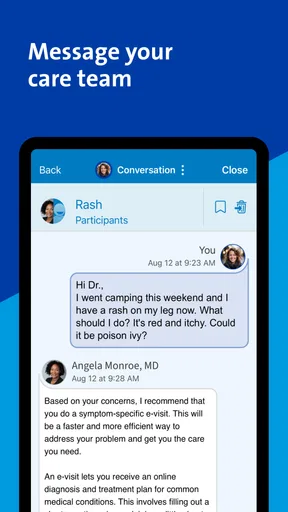
- Secure messaging helps patients communicate directly with their care team.
- Prescription refills and medication details are convenient to manage.
- Digital check-in can reduce waiting time at participating Northwell facilities.
- Useful health resources and provider information support informed decisions.
Limitations of MyNorthwell
- Many features require Northwell Health membership or an existing patient account.
- Some services may be unavailable outside participating Northwell locations.
- Appointment availability depends on the provider and may change frequently.
- Users may need to verify their identity before accessing sensitive health data.
- Occasional updates or technical issues can affect access to records and messages.
Similar Picks in This Category
View All
WebMD: Symptom Checker
WebMD, LLC4.1

Microphone Amplifier
DOSA Apps4.2

Anatomy Learning - 3D Anatomy
3D Medical OU4.5

Period Tracker and Calendar
SimpleInnovation4.9

GoodRx: Prescription Coupons
GoodRx4.8

CVS Health
CVS Pharmacy4.5
Frequently Asked Questions
What is MyNorthwell, and who can use it?
MyNorthwell is Northwell Health’s patient portal app for managing healthcare from an Android or iOS device. Eligible Northwell patients can use it to view medical information, communicate with care teams, manage appointments, review test results, and access other connected services. Availability may depend on your relationship with Northwell Health, your account status, and the services offered by your specific provider or facility.
How do I sign in or create a MyNorthwell account?
To use MyNorthwell, you generally need an existing Northwell Health account or patient record and must complete the registration process with your personal information. The app may ask you to verify your identity through an activation code, email, text message, or other security steps. If you already use the MyNorthwell website, the same credentials may work in the app. Contact Northwell support if registration or sign-in fails.
What can I do with the MyNorthwell app?
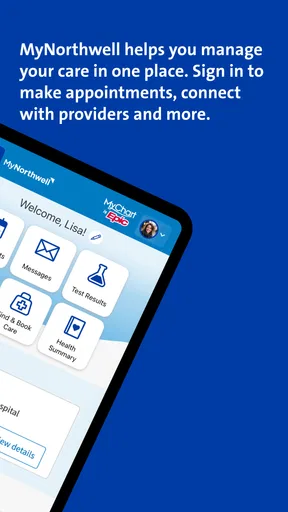
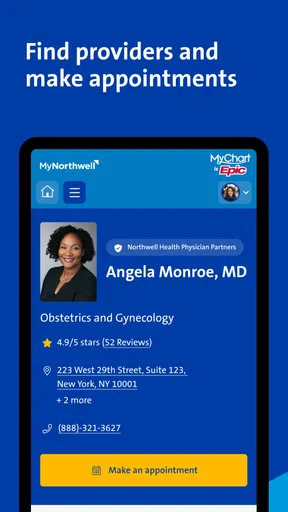
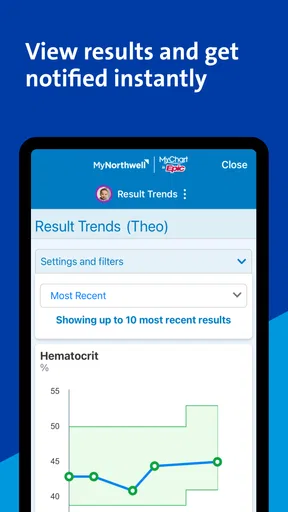
After signing in, you can typically use MyNorthwell to schedule or manage appointments, receive reminders, message participating healthcare providers, view portions of your medical records, check laboratory and imaging results, review medications, and manage billing-related information. Some users may also have access to virtual visits, estimates, prescription services, or family-member accounts. Available tools can vary by provider, location, and account permissions.
Is MyNorthwell secure, and how is my health information protected?
MyNorthwell is designed to provide access to personal health information through a protected patient portal, using account authentication and security measures intended to reduce unauthorized access. You should still protect your phone with a passcode or biometric lock, avoid sharing your login details, and sign out on shared devices. For additional protection, keep the app updated and use only official download sources.
Is MyNorthwell free, and does it replace contacting my doctor or emergency services?
Downloading and using the MyNorthwell patient portal is generally available without a separate app subscription, although normal mobile data or internet charges may apply. The app is intended for routine healthcare management and communication, not for emergencies or urgent diagnosis. If you have severe symptoms or believe you are facing a medical emergency, call local emergency services immediately instead of waiting for an in-app response.
